Coding can help children develop problem-solving skills, creativity, logical thinking, and confidence with technology. However, introducing programming to beginners does not have to involve complicated software or long lessons. Children can start by following simple instructions, solving puzzles, building patterns, and creating small interactive projects.
The best coding activities for beginners kids can enjoy are playful, hands-on, and appropriate for their age and experience. Some activities use paper, cards, or everyday objects, while others introduce children to visual programming tools and basic computer code. Both approaches help young learners understand how instructions work and how technology follows a sequence of commands.
Whether you are a parent looking for educational activities at home or a teacher planning a classroom lesson, these beginner-friendly ideas can make coding more approachable. With short sessions and plenty of room for experimentation, children can learn essential programming concepts while having fun.
Why Should Kids Learn Coding?
Coding is the process of creating instructions that tell a computer or digital device what to do. When children learn to code, they practice breaking large tasks into smaller steps, identifying patterns, testing ideas, and correcting mistakes.
These skills are useful beyond computer science. A child who learns to organize instructions for a simple game is also practicing planning and logical reasoning.
Beginner coding activities can help children develop:
- Problem-solving skills: Children learn to identify a challenge and test possible solutions.
- Logical thinking: They practice arranging instructions in a meaningful order.
- Creativity: They can design stories, games, animations, and interactive experiences.
- Persistence: They discover that mistakes are opportunities to improve a project.
- Collaboration: Group activities encourage children to share ideas and explain their thinking.
Children do not need advanced mathematics or previous programming experience to begin. The right activity should match their developmental stage, interests, and ability to follow instructions.
1. Play the Human Robot Game
The human robot game introduces one of the most important coding concepts: a computer follows specific instructions. It also demonstrates why instructions must be clear and precise.
How to play
Choose one child to act as a robot and another to act as the programmer. Place a toy, book, or other safe object a short distance away. The programmer must guide the robot toward the object using simple commands such as:
- Move forward one step.
- Turn left.
- Turn right.
- Stop.
The robot should follow each command exactly as given. If the programmer says something unclear, such as “go over there,” the robot can ask for a more precise instruction.
After the first attempt, switch roles so every child experiences both activities.
For an additional challenge, create a simple obstacle course using cushions or paper markers. Children must plan a sequence of movements that reaches the destination without hitting an obstacle.
What kids learn: Sequencing, clear instructions, algorithms, and debugging.
This activity is especially useful for younger children because it introduces programming without requiring a screen, keyboard, or reading-heavy instructions.
2. Create an Algorithm With Picture Cards
An algorithm is a set of ordered steps used to complete a task. Children already follow algorithms in everyday life when they brush their teeth, prepare a school bag, or follow a recipe.
This activity helps them recognize that familiar routines can be represented as instructions.
How to play
Prepare picture cards showing the steps of a simple activity, such as planting a seed, washing hands, or getting ready for school. Mix up the cards and ask children to arrange them in the correct order.
Next, ask them to explain why the sequence matters. For example, watering a plant before placing the seed in the soil may not be the intended order for the particular task.
For older children, introduce an unexpected change. Ask them to add a step, remove an unnecessary step, or rearrange the instructions to improve the process.
What kids learn: Algorithms, sequencing, organization, and logical reasoning.
Teachers can turn this activity into a group challenge by asking students to create their own picture cards for a familiar routine and exchange them with classmates.
3. Solve a Coding Maze
A coding maze combines movement, planning, and problem-solving. It encourages children to think ahead instead of making random moves until they reach the destination.
How to play
Draw a grid on paper or use floor tiles to create a simple maze. Place a starting marker at one end and a target, such as a toy or picture, at the other.
Give children direction cards representing moves forward, left, and right. Ask them to arrange the cards into a sequence that guides a character through the maze.
Before moving the character, children should predict where each command will take it. If the sequence fails, they can inspect the instructions, find the problem, and try again.
As children improve, introduce additional challenges:
- Add obstacles that must be avoided.
- Create a shorter route to the target.
- Increase the size of the maze.
- Ask children to explain why their solution works.
What kids learn: Algorithms, spatial reasoning, planning, and debugging.
Keep the first maze simple enough that children can succeed after a few attempts. The goal is to encourage experimentation rather than make the activity feel like a difficult test.
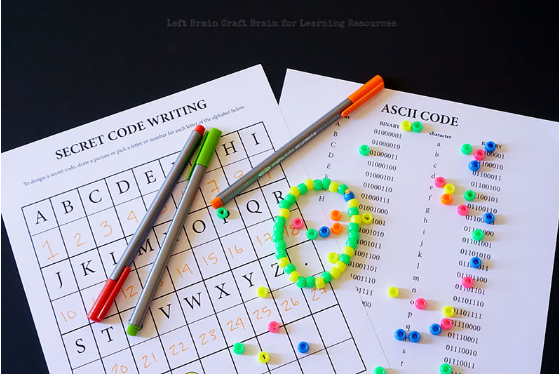
4. Learn Patterns With Binary Beads
Computers represent information using binary digits, commonly called bits. A bit can have one of two values: 0 or 1. Younger children do not need to understand the technical details immediately, but they can explore the idea of representing information with two different choices.
How to play
Give children two colors of beads, paper squares, or blocks. Assign one color to 0 and the other to 1. Ask them to create patterns using a fixed number of pieces.
For example, with three positions, children can explore combinations such as 000, 001, 010, and 111. Explain that each position can contain either of the two choices.
Older children can investigate how the number of possible patterns changes as they add more positions. They can also create a simple color code to represent letters or symbols, provided the class agrees on the rules first.
Use large, safe materials for young children who may put small objects in their mouths.
What kids learn: Patterns, representation, logical thinking, and an introductory understanding of binary information.
The activity should remain hands-on and visual rather than turning into a lesson filled with technical terminology.
5. Make a Story With Block-Based Coding
Visual programming tools allow children to create programs by connecting blocks that represent commands. Instead of memorizing programming syntax, beginners can focus on how instructions fit together.
A simple animated story is an excellent first project because children can combine characters, movement, dialogue, and backgrounds.
How to create the project
Ask children to plan a short story with a beginning, middle, and ending. They might create a character who walks across a screen, meets a friend, and shares a message.
Have them select a character and background, then connect basic commands to control movement or display dialogue. They can run the project, observe what happens, and adjust the instructions when the result differs from their plan.
Encourage children to add one new feature at a time. For example, they could make the character change position, wait before speaking, or play a sound when another character appears.
What kids learn: Events, sequences, creative design, and basic programming logic.
Choose an age-appropriate tool with a simple interface, and review its privacy settings before children create accounts or share projects online.
6. Design a Simple Interactive Quiz
An interactive quiz introduces children to the idea that a program can respond differently depending on what a user does.
The project can be based on a favorite animal, a school subject, basic mathematics, or general knowledge.
How to build it
Start by writing three simple questions and their correct answers. Ask children to decide what should happen when someone selects the right answer and what should happen when the answer is incorrect.
In a block-based programming environment, students can use input, conditions, and feedback messages to build the quiz. A correct answer might display “Great job!” while an incorrect answer could offer a hint.
For children who are not ready to use software, the same idea can be demonstrated with paper cards and a partner acting as the program.
Once the basic quiz works, students can add a score counter, another question, or a final results screen.
What kids learn: Conditional logic, input and output, testing, and user experience.
This activity also encourages children to think about how software communicates with the person using it.
7. Create a Digital Drawing or Animation
Digital art offers a creative introduction to programming for children who enjoy drawing, storytelling, or design. Instead of beginning with a complex game, students can create a picture that changes when a command runs.
How to create the project
Ask children to choose a theme, such as outer space, a garden, or an underwater world. They can draw or select a background and add several objects.
Next, introduce a simple action. One object might move across the screen, another might change size, or a character might appear after a button is pressed.
Encourage students to test each action and observe whether the program behaves as expected. They can then combine several commands into a short animation.
For a collaborative classroom project, each student can design one scene and explain how its commands work.
What kids learn: Events, sequencing, creative problem-solving, and iterative design.
Let children personalize their projects. A sense of ownership can make the process more engaging and encourage them to experiment with new ideas.
8. Build a Simple Game With Rules
After children understand sequences and basic events, they can begin creating a simple game. A beginner project might involve moving a character toward a target, collecting objects, or avoiding an obstacle.
The most important part is to begin with a small, achievable goal rather than attempting a complicated game immediately.
How to create the project
First, ask children to describe the game in one or two sentences. Define what the player can do, what counts as success, and what happens when the game ends.
Next, build the essential features. For example, a character might move when an arrow key is pressed, and the player might earn a point when the character touches a target.
Test the game several times. Ask children to identify confusing controls, unexpected behavior, or situations where the game does not respond correctly.
After the basic version works, students can add a timer, additional targets, or a new level.
What kids learn: Events, conditions, testing, game design, and debugging.
Celebrate a working first version before adding more features. Finishing a small project can build confidence and prepare children for more advanced programming.
Tips for Choosing Coding Activities by Age
Children learn at different rates, so age should be treated as a general guide rather than a strict rule.
- Ages 4–6: Begin with movement games, picture-card algorithms, simple patterns, and short activities with adult guidance.
- Ages 7–9: Introduce coding mazes, step-by-step challenges, simple visual programming, and interactive stories.
- Ages 10–12: Explore quizzes, animations, game mechanics, conditions, and more complex debugging challenges.
- Ages 13 and older: Offer opportunities to experiment with block-based programming, introductory text-based code, and projects connected to personal interests.
Keep sessions manageable and provide breaks when children lose focus. Some learners may prefer building physical models, while others enjoy creating digital stories or games.
Common Mistakes to Avoid When Teaching Coding
Starting with complicated code: Too many new concepts can discourage beginners. Begin with one clear goal and introduce additional features gradually.
Focusing only on the final result: Children learn through testing, revising, and explaining their decisions. The process matters as much as a finished project.
Treating errors as failure: A program that does not work as expected provides an opportunity to practice debugging. Encourage children to change one thing at a time and test again.
Choosing activities that are too difficult: Adjust the instructions, materials, and level of independence to match each child’s needs.
Spending too much time on screens: Unplugged activities can teach essential programming ideas without requiring a computer. A balanced mix of physical and digital tasks can make lessons more accessible.
Frequently Asked Questions
What is the best age for kids to start coding?
Children can begin exploring coding concepts in early childhood through games, movement, patterns, and simple instructions. More structured programming can be introduced when children are ready to follow the relevant steps and understand the activity.
Can kids learn coding without a computer?
Yes. Human robot games, coding mazes, picture-card algorithms, and pattern activities introduce programming concepts using everyday materials. These activities can prepare children for digital programming later.
How long should a beginner coding activity take?
Many beginners benefit from short sessions of around 15 to 30 minutes, depending on their age, attention span, and the complexity of the task. Some projects may require several sessions.
Do children need mathematics skills to learn coding?
Basic counting and logical reasoning are useful, but beginners do not need advanced mathematics. Children can start with simple sequences and gradually explore more complex concepts as their skills develop.
Conclusion
Learning to code can be an enjoyable way for children to explore technology, express creativity, and develop problem-solving skills. The most effective beginner activities provide clear goals, manageable challenges, and opportunities to experiment without fear of making mistakes.
From human robot games and coding mazes to interactive quizzes, animations, and simple games, these coding activities for beginners kids can try offer multiple ways to discover programming. Parents and teachers can choose activities based on children’s ages, interests, and available resources.
Start with one simple project, celebrate progress, and encourage children to explain how their solutions work. With regular practice and room for curiosity, beginners can build the confidence needed to explore more advanced coding projects over time.
Leave a Reply